Stop Losing Customers to Slow Replies
Every unanswered message could be a lost booking. WelaOS responds instantly, answers questions and helps turn enquiries into paying customers, even when your team is busy.

Booking, shared CRM and POS for salons, spas and massage teams from US$20/month. Add AI Receptionist to answer questions, find availability and confirm bookings in chat.
No technical skills. No complicated setup. Just 3 simple steps.
Try a booking, then refine your services, staff assignments and channel settings.
Every unanswered message could be a lost booking. WelaOS responds instantly, answers questions and helps turn enquiries into paying customers, even when your team is busy.
Stop wasting valuable hours switching between chats, calendars and paperwork. Run bookings, payments, staff and customer records in one place so your team can focus on serving customers.
Don't let past customers forget about you. Bring them back with smart follow-ups, loyalty rewards and targeted offers that encourage more repeat visits.
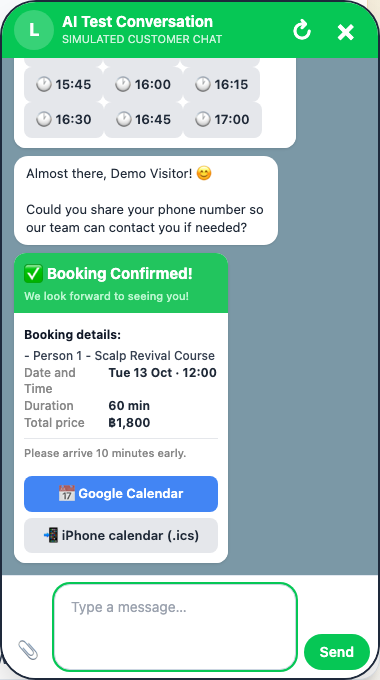
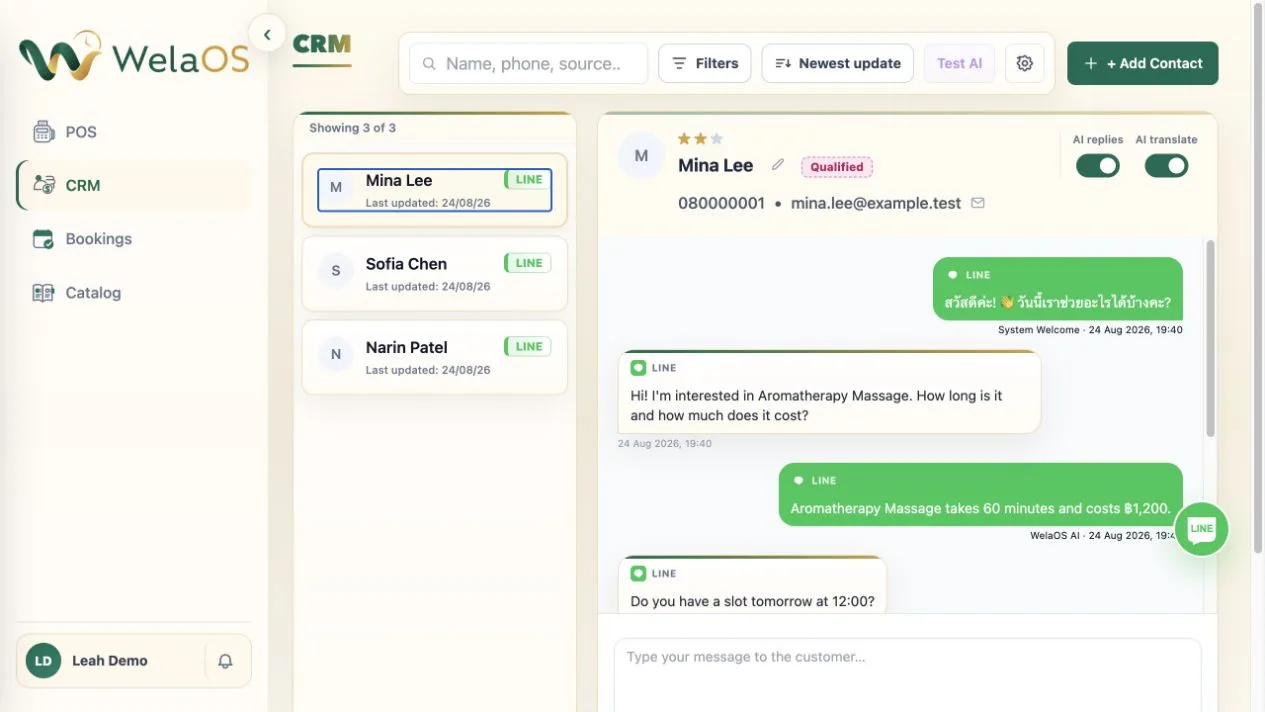
Messages from LINE, Instagram, WhatsApp, Messenger and other connected channels come together in one CRM. WelaOS AI can answer customers, find an available time and confirm the booking for your team.
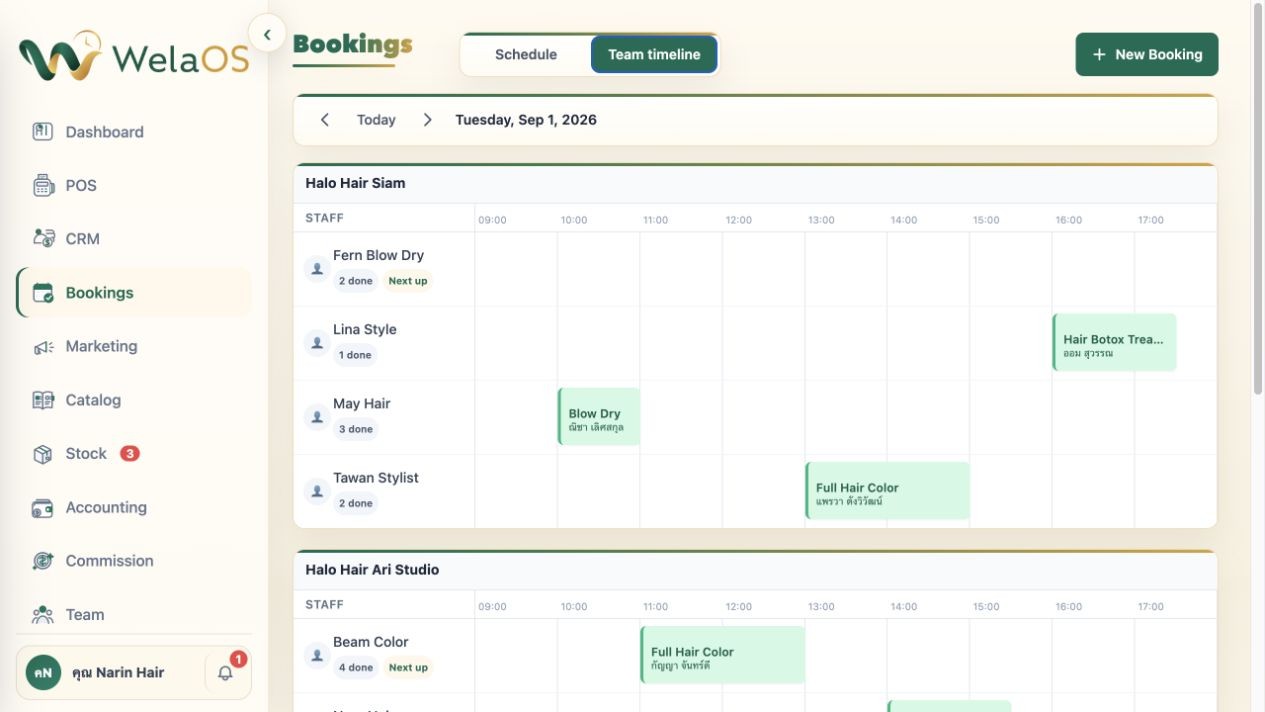
See the day’s appointments in one shared calendar. Staff can open bookings and update the schedule, so everyone can keep track of what’s happening.
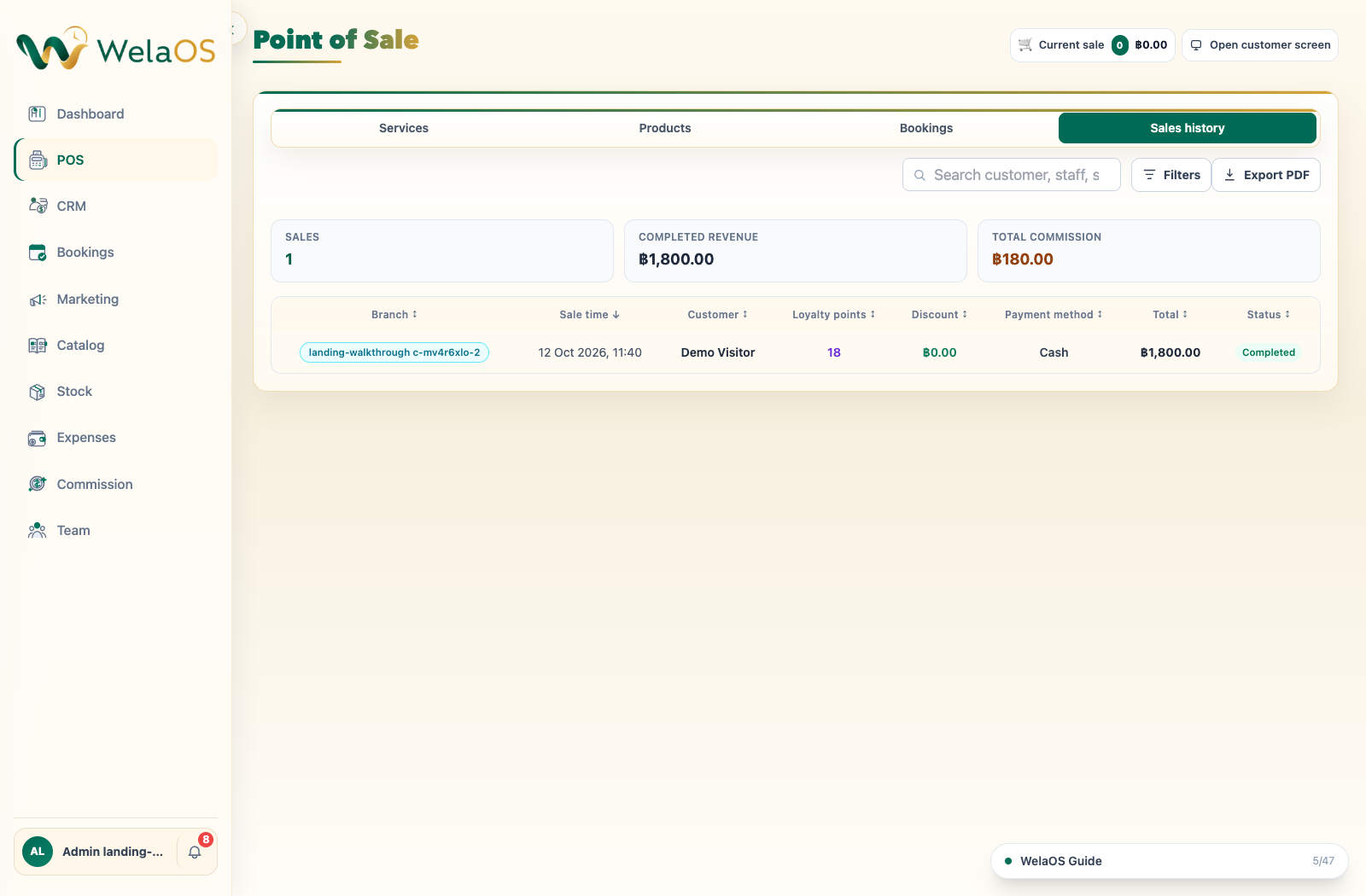
Open the booking, take payment and complete the sale. WelaOS POS records payment details, loyalty points earned and staff commission together for easy reference.
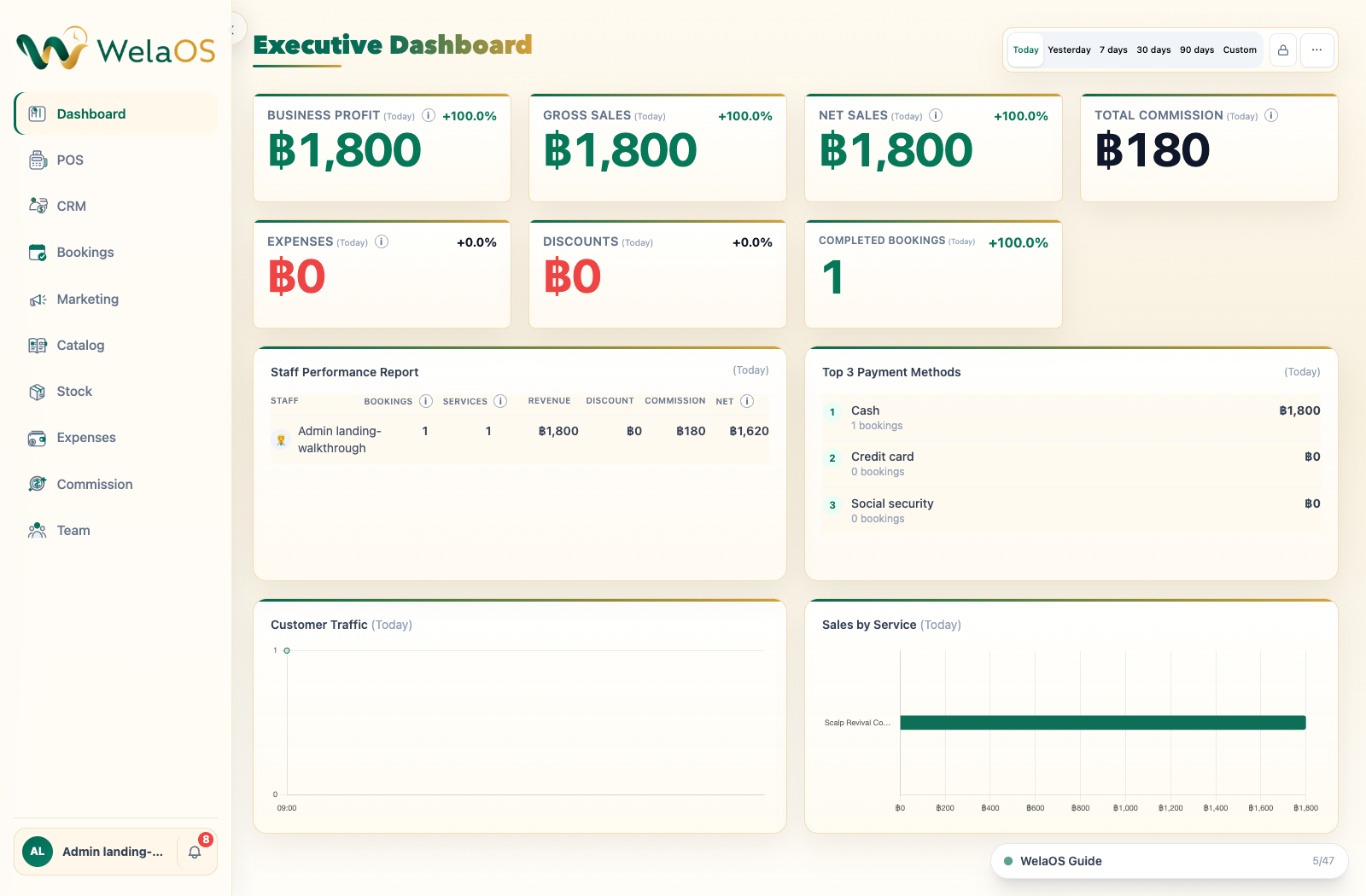
View sales, completed bookings, commissions, payment methods and service performance in one dashboard. Filter by date to see the results for the period you choose.

Bookings, team availability, CRM and POS for hair, nail, lash, beauty, spa, massage and wellness businesses.
Explore salon workflow →
Connect LINE enquiries with bookings, pre-visit intake, treatment packages and POS. AI uses clinic-approved information; clinicians make clinical decisions.
Explore use case →
Create patient-specific treatment plans, schedule multiple visits and check out completed work in POS. Clinical staff control treatment decisions and approvals.
Explore use case →
Track reception, nursing intake, service and lab handoffs, clinician-reviewed OPD records and actual POS checkout in one clinic visit.
Explore use case →
Set dated tour or class departures, track capacity and booking parties, manage configured resources and check out each booking in POS.
Explore use case →
Turn LINE print enquiries into structured orders, estimates based on configured catalog rules, and POS records for deposits and balances.
Explore use case →The conversation gets handed off, and the work is scattered across separate tools.
Bookings, sales, payments, commissions and marketing sit in separate tools. That means more admin work, a higher risk of missed bookings and payment errors, and fewer chances to bring customers back.
One conversation for customers. One connected system for your team.
POS records sales and loyalty, calculates commission, deducts stock and updates the dashboard. Targeted marketing brings the right customer segments back.

Small businesses understand the potential of AI, but daily firefighting often leaves no time to implement better systems. Here is why and how to break the cycle
Read article →
AI marketing becomes more useful when CRM, sales, conversations and campaigns are connected.
Read article →
AI receptionists can answer customers, book appointments and support sales, but only when they understand your business. Learn why business context matters.
Read article →Yes. Customers can message WelaOS AI in the language they’re comfortable with. It can understand and reply in that language, so they can ask questions and book naturally, just as they would with a receptionist.
Yes, sometimes. AI can misunderstand a message, especially when a request is unclear. From the results we currently track, it answers routine questions about services and business information correctly about 99% of the time. Straightforward bookings also succeed about 99% of the time. Very complex bookings, such as group bookings with different services, similar service names or add-ons, currently succeed about 70% of the time. These are current results, not a promise that every request will work perfectly.
WelaOS AI draws on four sources:
For questions about your own massage or treatment services, the AI uses your catalog and business information.
If the AI doesn’t know: It tells the customer and can offer to hand the question to your team. A staff member replies manually, and WelaOS can suggest that reply as a knowledge-base update. You review and approve the suggestion before the AI can use it in future answers. Missing information on one topic does not switch the AI off.
The AI works out what the customer is asking for, then uses the same WelaOS booking system your staff use. It checks the service or treatment, its duration, staff availability and the booking rules before recording the appointment.
If the AI still cannot move the conversation forward after two attempts, WelaOS pauses its automatic replies in that conversation and alerts your team. If the customer is trying to book, it can also offer a booking menu with buttons so they can continue. A staff member can step in whenever needed.
The AI can explain services and treatments using information your business provides. It does not diagnose, decide whether a treatment is suitable for someone or make clinical decisions. Those decisions stay with your dentist or clinician. Questions that need clinical judgement should go to your clinical team.
No. WelaOS does not train its own AI model using your customer conversations. An automated quality check reviews interactions each day and reports what worked and where the AI struggled. Our team looks at these reports and improves the system’s instructions and workflows. The AI does not learn from each conversation or change its model by itself.
WelaOS keeps business accounts separate, supports access permissions by role and keeps audit records. Your team decides which staff can access the system.
Yes. WhatsApp, LINE, Instagram and Facebook Messenger are already being used by WelaOS customers.
Facebook, Instagram and WhatsApp can be connected from Settings with one click and synchronized with WelaOS. Connecting a LINE Official Account requires API keys; we provide step-by-step instructions and can help with setup.
WelaOS can also connect Telegram, TikTok, WeChat and email. Email can answer customer questions and help with bookings through the same conversational workflow.
These additional channels work, but customers have not used them regularly yet, so they still need real-world testing. If you are among the first to use one, our team can help test the connection and fix any setup issues.
If you would like another social media or booking channel, tell us what you use and we can work with you on an integration.
No. Customers can message your business through the social media channels they already use and book by describing what they need in their own words. They do not need a separate WelaOS app.
You can set up the basics in about five minutes by adding team members, uploading your service list and connecting a social media channel. That is enough to try the basic booking system with AI.
More detailed setup takes longer and can include service extras, staff assignments, additional channels and commissions.
You can bring data from screenshots, PDFs, Excel files and other supported formats. AI-assisted import can help map your service catalog, CRM records, accounting records and other supported information. You can review the data before importing it.
Yes. WelaOS supports booking pages, a button-based booking bot, bookings entered by your team in the admin system, and AI booking. Start with the methods that suit your business and add more when you are ready. For example, you could begin with a booking page or staff-entered bookings, then add the button-based bot on one channel and try AI booking when your team is ready. You do not have to turn on every booking method or channel at once.
Start with Core, which includes booking pages, chat booking buttons, CRM, POS and automatic staff commissions. AI Receptionist is optional; AI translation, customer follow-up, social comment replies and Google review replies require it. Choose your team size and add-ons in the pricing builder. Contact us about early-access or custom workflows.
Start a 30-day Core trial with AI Receptionist without a payment card. It includes 500,000 weighted AI tokens for the full trial period. Paid AI Receptionist includes 3,000,000 weighted AI tokens per month; other AI add-ons are selected separately.
You pay when you choose paid Core access and complete checkout. Review your billing period, team members, optional AI add-ons and total before you pay. Starting the free trial does not create a paid subscription.

